
How does PromoEQP
work?
It's simple: add the monthly code to your orders. PromoEQP uses the same code for all of our suppliers — and it updates on the first of every month. There are five ways to get it.
Five ways to find it.
-
01
Watch your inbox on the 1st
On the first of each month you'll get an email from Updates@PromoEQP.com with the new code. Depending on your settings it can land in junk — if you don't see it, check your spam folder and mark it "not spam" so next month's arrives cleanly.
-
02
Use the monthly update page
Every monthly update is posted publicly, newest first — the current code sits at the top, alongside supplier news, webinar replays, and special offers. Bookmark it:
promoeqp.com/discount-code → -
03
Log in to your account
Sign in with your username and password at dashboard.promoeqp.com. The current code sits in the green button at the top right of your dashboard — click Copy and paste it straight onto your order.
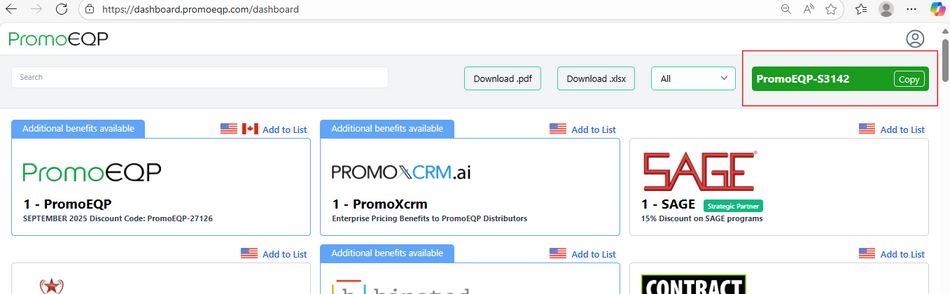
PromoEQP dashboard — tap to enlarge -
04
Find it inside SAGE
If you're a SAGE user, the code is posted every month in SAGE Workplace under the PromoEQP Community — along with the rest of that month's update. More on the SAGE partnership →
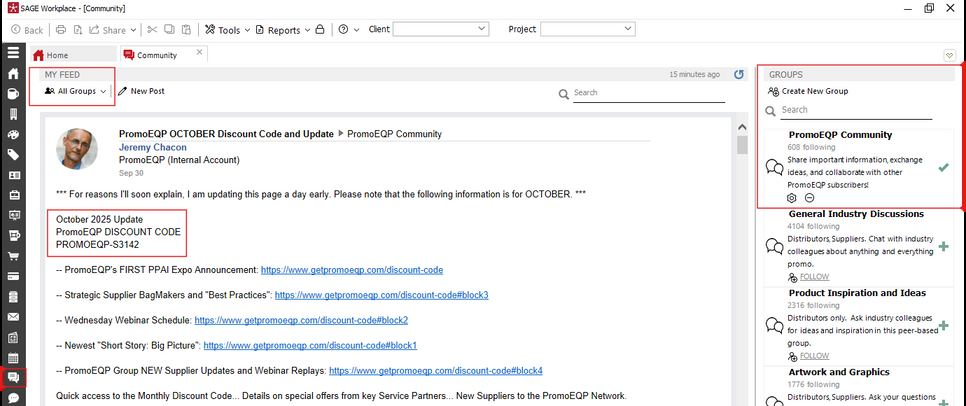
SAGE Workplace Community — tap to enlarge -
05
Keep it in your browser
Install PromoEQP Companion, free for members, and sign in with the same username and password. This month's code is one click away in your toolbar, with a Copy button — along with your pricing with every supplier and their current deals. For Chrome, Edge, Firefox and Safari.
Get the extension →
Welcome to the network.
Your membership is open from day one — every supplier, every price list, every tool. Start by browsing who's on the list, and reach out any time you need a hand.